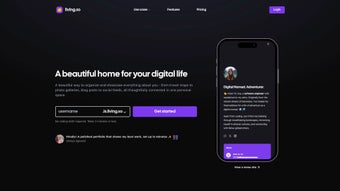

Download Living.so – All‑in‑One Digital Home Experience for Creators
What Is Living.so? – A Comprehensive Overview
Living.so is a cloud‑based, subscription‑driven platform that redefines how individuals and professionals showcase their digital presence. By blending the flexibility of Notion’s block‑based editor with the publishing power of WordPress and the link‑aggregation simplicity of Linktree, Living.so provides a single, customizable canvas where users can weave together travel itineraries, photo galleries, blog posts, and live social feeds. The core philosophy behind the service is to eliminate the fragmentation that often occurs when creators rely on multiple disparate tools.
Instead of juggling a blog, a portfolio site, a social‑media hub, and a map‑tracker, you get one unified “digital home” that lives at a single URL. The platform’s drag‑and‑drop widget builder requires no coding knowledge; you simply select a widget—such as an interactive world map, a sleek link card, or a dynamic carousel—and place it wherever it enhances your narrative. This approach enables both novice creators and seasoned developers to craft polished, interactive pages in minutes.
Because Living.so operates entirely in the browser, it delivers instant updates, automatic backups, and continuous security patches, ensuring your digital home remains both current and protected. Whether you’re a travel blogger chronicling global adventures, a visual artist showcasing a portfolio, or a freelancer building a professional hub for clients, Living.so offers a flexible, secure, and aesthetically pleasing solution that grows with your brand.
Core Features & Benefits – Why Living.so Stands Out
- Drag‑and‑Drop Widget Builder: Add, move, and resize widgets such as maps, galleries, and social feeds without touching a line of code.
- Interactive World Maps: Pin locations, embed travel notes, and let visitors explore your journeys on a responsive globe.
- Custom Link Cards: Design eye‑catching link previews that match your brand colors and typography.
- Photo Carousels & Galleries: Create fullscreen slideshows, grid layouts, or lightbox galleries with lazy loading for fast performance.
- Live Social Media Feeds: Pull in Instagram, Twitter, TikTok, or YouTube streams that update automatically.
- Hierarchical Content Organization: Use nested folders and tags to keep content structured, making it easy to navigate and SEO‑friendly.
- Built‑in Blogging Engine: Publish articles, journal entries, or announcements directly within your Living.so space.
- Responsive Design Templates: Choose from a library of mobile‑first templates that adapt to any screen size.
- Secure Cloud Hosting: All data is stored on encrypted servers with daily backups, ensuring your digital home is safe.
- Regular Updates & New Widgets: Subscribers receive monthly feature drops, keeping the platform modern and versatile.
Pros
- All‑in‑one platform eliminates the need for multiple services.
- Intuitive drag‑and‑drop editor requires no technical expertise.
- Responsive templates guarantee a polished look on any device.
- Regular updates keep the feature set fresh and secure.
- Integrated analytics help you track visitor engagement.
- Secure cloud hosting with daily backups protects your data.
- Custom domain support enhances branding and SEO.
- Rich widget library offers endless creative possibilities.
Cons
- Subscription cost may be a barrier for casual users.
- Limited offline editing; you need an internet connection to make changes.
- Advanced customization (e.g., custom CSS) is only available on higher‑tier plans.
- No native mobile app; management is done through the web dashboard.
- Learning curve for users unfamiliar with hierarchical content organization.
By consolidating these capabilities into a single, secure environment, Living.so empowers creators to focus on storytelling rather than technical maintenance. The platform’s emphasis on visual storytelling, combined with robust SEO tools, means your digital home can attract organic traffic while delivering a memorable user experience. Whether you aim to boost personal branding, showcase a portfolio, or simply centralize your online presence, the feature set and associated benefits make Living.so a compelling choice in today’s crowded digital landscape.
Getting Started, Daily Use, and Compatibility
Living.so is built on modern web standards, meaning it works flawlessly on all major browsers (Chrome, Firefox, Safari, Edge) and operating systems. Whether you’re on Windows 10/11, macOS Monterey or later, any Linux distribution, Android, or iOS, the interface remains responsive and fast. Because the service lives entirely in the cloud, there are no platform‑specific binaries to download, making it a truly cross‑platform solution that you can access from any device with an internet connection.
Step‑by‑Step Installation & Daily Workflow
- Create an Account: Visit living.so, click “Start Free Trial,” enter your email, set a strong password, and verify via the confirmation link.
- Choose a Subscription: Select the “Creator” (monthly) or “Professional” (annual) plan. The annual plan includes a 15 % discount and unlocks advanced customization options.
- Configure Your Domain: Use a custom sub‑domain (e.g., yourname.living.so) or connect a personal domain (e.g., yourname.com) through the DNS settings panel.
- Select a Starter Template: Pick from travel journal, portfolio, or link‑hub templates. The system auto‑populates a basic layout to jump‑start your design.
- Populate Widgets: Drag a “Map” widget onto the canvas, add pins, descriptions, and photos. Continue adding “Gallery,” “Blog,” “Social Feed,” or any other widget from the left‑hand toolbar.
- Style Your Page: Adjust fonts, colors, spacing, and upload a logo or background image via the style panel. Real‑time preview lets you see changes instantly.
- Publish & Share: Click “Publish” to go live. A shareable link is generated automatically, and you can also embed the page on other sites.
- Maintain & Update: Return to the dashboard anytime to add new widgets, edit existing content, or tweak design elements. All changes are saved instantly and reflected on the live site.
- Monitor Performance: Use the built‑in analytics dashboard to track visitor numbers, geographic data, and referral sources. Optimize meta‑tags directly within the platform for better SEO.
- Secure Your Account: Enable two‑factor authentication (2FA) for added protection and regularly review security settings.
The daily workflow is intentionally streamlined: after the initial setup, you spend only a few minutes adding new content or tweaking design elements. Because everything is cloud‑hosted, there’s no need for manual backups or software updates—Living.so handles those automatically. Whether you’re adding a fresh travel photo from your smartphone or publishing a new blog post from your laptop, the experience remains consistent, fast, and secure across all devices.
Frequently Asked Questions
Below you’ll find answers to the most common questions about Living.so, covering topics from domain setup to security and customization. This section is designed to help new users get up to speed quickly and to clarify any lingering doubts before you commit to a subscription.
Can I use my own domain with Living.so?
Yes. Living.so allows you to connect any custom domain you own. You simply update your DNS records with the values provided in the dashboard, and the platform will serve your digital home from your own URL.Is there a free version or trial?
Living.so offers a 14‑day free trial with full feature access. After the trial, you’ll need to select a paid subscription to continue using the service.How secure is my data on Living.so?
All data is stored on encrypted servers with daily automated backups. Two‑factor authentication (2FA) is available to protect your account, and the platform complies with GDPR and CCPA regulations.Can I embed third‑party content like YouTube videos?
Absolutely. Living.so includes embed widgets for YouTube, Vimeo, SoundCloud, and many other services. Simply drop the embed widget onto your page and paste the share URL.Do I need any technical knowledge to build a page?
No. The drag‑and‑drop interface is designed for non‑technical users. While advanced users can add custom CSS on premium plans, most creators can achieve professional results using the built‑in widgets and style options.Conclusion – Is Living.so the Right Choice for You?
If you’ve ever felt overwhelmed by the need to maintain separate blogs, portfolio sites, social‑link pages, and travel journals, Living.so offers a unified, elegant alternative that saves time, reduces cost, and boosts your online branding. Its strength lies in the seamless integration of visual storytelling tools, robust security, and continuous feature updates—all accessible through a browser‑based, drag‑and‑drop editor that requires no coding. While the subscription model may seem like an added expense, the value derived from having a single, secure, and fully customizable digital home often outweighs the cost, especially for creators, freelancers, and small businesses seeking a professional online presence without hiring a developer. Ready to simplify your digital footprint and showcase your story in a modern, responsive format? Start your free trial today and experience how effortless it can be to build a living, breathing digital home that grows with you.
Pros: Unified platform, drag‑and‑drop ease, responsive templates, secure hosting.Cons: Subscription cost, no offline editing, limited custom CSS on lower plans.



.png)



